Google Code Prettify

顯示具有 Gradle 標籤的文章。 顯示所有文章

2018年2月26日 星期一

Gradle: 編譯 spring boot application

這篇說明如何使用 Gradle 編譯 spring boot application,直接來看個例子。
buildscript {
    ext {
        springBootVersion = '1.5.10.RELEASE'
    }
    repositories {
        maven { url "http://maven.springframework.org/milestone" }
        maven { url "http://repo.maven.apache.org/maven2" }
        maven { url "http://repo1.maven.org/maven2/" }
        maven { url "http://amateras.sourceforge.jp/mvn/" }
        mavenCentral()
        jcenter()
    }
    dependencies {
        classpath("org.springframework.boot:spring-boot-gradle-plugin:${springBootVersion}")
    }
}

apply plugin: 'java'
apply plugin: 'org.springframework.boot'

group = 'idv.steven.crawler'
sourceCompatibility = 1.8
targetCompatibility = 1.8

bootRepackage {
    mainClass = 'idv.steven.crawler.CrawlerStarter'
}

jar {
    baseName = 'my-crawler'
    version =  '1.0.0'  
}

buildDir = 'build'

repositories {
      mavenCentral()
      maven { url "http://maven.springframework.org/milestone" }
      maven { url "http://repo.maven.apache.org/maven2" }
      maven { url "http://repo1.maven.org/maven2/" }
      maven { url "http://amateras.sourceforge.jp/mvn/" }
}

configurations.all {
      exclude group: 'log4j', module: 'log4j'
      exclude group: 'org.slf4j', module: 'slf4j-log4j12'
      exclude group: 'org.slf4j', module: 'log4j-over-slf4j'
      exclude group: 'ch.qos.logback', module: 'logback-core'
      exclude group: 'ch.qos.logback', module: 'logback-classic'
}

dependencies {
      def log4j2Version = '2.10.0'
      def fasterxmlVersion = '2.9.3'
      def hibernateVersion = '5.2.13.Final'
 
      compile fileTree(dir: 'lib', include: ['*.jar'])

      compile("org.springframework.boot:spring-boot-starter-web") {
          exclude module: "spring-boot-starter-tomcat"
      }
      compile('org.springframework.boot:spring-boot-starter-aop')
      compile('org.springframework.boot:spring-boot-starter-batch')
      compile('org.springframework.boot:spring-boot-starter-data-jpa')
      compile('org.springframework.boot:spring-boot-starter-mail')
      compile("org.thymeleaf:thymeleaf-spring4")
      compile("nz.net.ultraq.thymeleaf:thymeleaf-layout-dialect")
 
      compile group: 'org.hibernate', name: 'hibernate-core', version: "${hibernateVersion}"
      compile group: 'org.hibernate', name: 'hibernate-entitymanager', version: "${hibernateVersion}"
      compile group: 'org.hibernate', name: 'hibernate-validator', version: '6.0.7.Final'
 
      compile group: 'javax.inject', name: 'javax.inject', version: '1'
      compile group: 'org.apache.logging.log4j', name: 'log4j-api', version: "${log4j2Version}"
      compile group: 'org.apache.logging.log4j', name: 'log4j-core', version: "${log4j2Version}"
      compile group: 'org.apache.logging.log4j', name: 'log4j-slf4j-impl', version: "${log4j2Version}"
      compile group: 'joda-time', name: 'joda-time', version: '2.9.9'
      compile group: 'com.fasterxml.jackson.core', name: 'jackson-core', version: "${fasterxmlVersion}"
      compile group: 'com.fasterxml.jackson.core', name: 'jackson-databind', version: "${fasterxmlVersion}"
      compile group: 'com.fasterxml.jackson.core', name: 'jackson-annotations', version: "${fasterxmlVersion}"
      compile group: 'org.json', name: 'json', version: '20180130'
      compile group: 'net.minidev', name: 'json-smart', version: '2.3'
      compile group: 'javax.xml.bind', name: 'jaxb-api', version: '2.3.0'
      compile group: 'javax.validation', name: 'validation-api', version: '2.0.1.Final'
      compile group: 'com.lmax', name: 'disruptor', version: '3.3.7'
 
      compileOnly "org.projectlombok:lombok:1.16.20"
 
      testCompile('org.springframework.boot:spring-boot-starter-test')
      testCompile('org.springframework.batch:spring-batch-test')
}

  • 一開始 buildscript 中紅色部份,設定 spring boot 版本,後面 dependencies (依賴) 的部份引入 spring boot 時,即會引入這個版本。
  • buildscript 的 repositories 指定了好幾個版本庫,一般都只指定 mavenCentral(),但是,有時這個版本庫裡可能沒有我們要的 jar 檔,也可能剛好掛了或被公司防火牆擋了,設定多個比較可以確保可以抓到需要的 jar 檔。
  • apply plugin 我們導入 java 和 org.springframe.boot,這樣我們就可以使用這兩個物件的 method。
  • bootRepackage (黃底) 設定這個 application 的 main 檔在那一個類別裡。
  • jar (綠底) 設定了這個 application 編譯出來的檔名及版號。
  • buildDir (紅底) 指出編譯出來的檔案要放在那個目錄下,不指定的話,預設就會放在 build 目錄下。
  • configurations.all 在這裡可以定義一些 global 的設定,以上例來說,定義了在依賴關係中,如果有依賴這些 jar 檔的,就不要引入,因為 spring boot 預設是的 log 機制是用 logback,有些其它的 framework 預設是用 log4j,但是我希望這個程式用 log4j2,所以在 這些設定排除 logback 及 log4j 的 jar 檔。
  • compile fileTree 是當有一些 jar 檔就在自己的本機,因為我有使用一些公司內部自行開發的共用函式庫的 jar 檔,這些 jar 檔放在 lib 目錄下,如此設定,就會把這些 jar 檔也包進來一起編譯。
  • exclude module (紫底) 是在設定要引入的 jar 檔時,Gradle 會自動將相依的 jar 檔包裝進來,但是,有時有些 jar 檔我們並不需要,就可以用這個方法將它排除! 在 spring boot 中,引入 web 時,預設會包含 embedded tomcat,但是這個程式不是 web 程式,只是會用到 http client,所以將 embedded tomcat 排程。這裡還有個要特別注意的,spring boot 在一開頭已經有設定版號,這些不需寫版號。
  • 有些 jar 檔只有在 compile 階段會用到,這時候就可以用 compileOnly (橘底),lombok 只是在編譯時幫程式員產生些像是 getter、setter method,或是 log 的宣告等,以簡化程式的撰寫,但是產生好讓 Gradle 編譯後,就沒它的事了,runtime 並不會用到,也不會被包入最後產生的 jar 檔裡。
  • testCompile 是用來引入單元測試用的 jar 檔,這些 jar 檔只有開發階段進行單元測試時會用到,也不會被包入最後產生的 jar 檔裡。

2018年2月23日 星期五

Gradle: task

Gradle 中可以有許多 task,透過 task 可以將 build.gradle 中的工作分成細項,讓我們指定要執行的項目,現在來看個例子:
version = '0.1.0-SNAPSHOT'

task first(group: "test", description: "first task") { 
    doLast {
        println "first" 
    }
}

task second { 
    doLast {
        println "second" 
    }
}

task printVersion(dependsOn: [second, first], group: "test", description: "printVersion task") {
    doLast {
        logger.quiet "Version: $version"
    }
}
  • task 的屬性: group、description
如上有三個 task,task first 後面還帶了兩個屬性 - group、description,group 可以用來將 task 編組,description 則可以用來描述 task 的功用,這有什麼好處? 我們可以執行:
gradle tasks --all
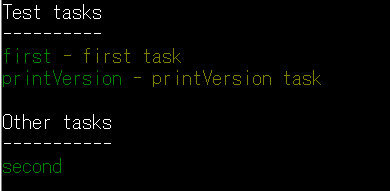
這個命令可以列出所有 task,結果如下:
可以看到 first、printVersion 兩個 task 被放在同一組,也有加上 description 的說明,這樣可以方便非 gradle script 的編寫者了解 gradle script 中各個 task 的功用。
  • 使用 dependsOn 定義 task 間的依賴關係
看完說明,執行看看,指令如下:
gradle printVersion
這個指令是指出,只執行 printVersion 這個 task 就好,執行結果如下:
結果三個 task 都有執行,因為在 printVersion 中有個 dependsOn 屬性,指出在執行 printVersion 前要先執行 second 和 first,所以三個都執行了! 要特別注意的是,dependsOn 不保證 task 依賴的順序,就像 gradle script 中寫的是 [second, first],看似要先執行 second,實際上卻先執行 first。
  • -q 即是 quiet
上面的執行方式有點"雜訊",如果我們只想輸出 task 本身輸出的訊息,指令可以如下:
gradle -q printVersion
得到如下結果:


2017年8月10日 星期四

Gradle: 編譯、測試 web 專案

Java 專案的編譯、測試、部署,從十幾年前很流行的 ant,到現在則是以 Maven 及 Gradle 最流行,這篇先簡單的介紹怎麼用 gradle 將 web 專案打包成 war 檔。
  • 安裝 Gradle
請到 Gradle 的官網下載 Gradle,並依上面步驟安裝設定好環境。
  • build.gradle


如果是用 eclipse 開發,在專案的根目錄下新增一個文字檔,檔名為 build.gradle,這個檔名不是強迫非取這個名稱不可,只不過這是預設的檔名,這一篇希望快速的用 gradle 來編譯、測試及包裝 war 檔,一切都採預設值。接下來還有一些目錄也都是 gradle 預設的,以後有空會說明怎麼使用非預設的目錄,但是這邊我們把程式都放到預設目錄,現在說明這些目錄的用處 (目錄當然要自己建立啦~)。
  1. src/main: 網站相關的檔案,像是 java、jsp、html、*.properties、*.xml ... 都放在這個目錄下的子目錄。
  2. src/main/java: 顧名思義,這裡是放 java 程式碼的地方。
  3. src/main/webapp: 這個目錄就相當於一般我們用 eclipse 產生一個 web project 時,eclipse 自動幫我們產生的 WebContent,這個目錄在部署後就會相當於網站的根目錄。
  4. src/test/java: 測試程式放這個目錄下,只要裡面有測試程式,每次執行 gradle 時,在 compile 並包裝成 war 這些工作完成後,gradle 還會來執行這些測試程式產生測試報告。
接下來直接看一個簡單的 build.gradle 吧 ~
 1 apply plugin: 'java'
 2 apply plugin: 'war'
 3 
 4 sourceCompatibility = 1.8
 5 version = '1.0'
 6 
 7 sourceSets {
 8     main {
 9         java {
10             srcDirs = ['src/main/java']
11         }
12         resources {
13             srcDirs = ['config']
14         }
15     }
16     test {
17         java {
18             srcDirs = ['src/test/java']
19         }
20     }
21 }
22 
23 buildDir = 'out'
24 
25 repositories {     
26      maven { url "http://maven.springframework.org/milestone" }
27      maven { url "http://repo.maven.apache.org/maven2" }
28      maven { url "http://repo1.maven.org/maven2/" }
29      maven { url "http://amateras.sourceforge.jp/mvn/" }
30      mavenCentral()
31 }
32 
33 configurations.all {
34     exclude group: 'org.freemarker', module: 'freemarker'
35     exclude group: 'javax.el', module: 'el-api'
36     exclude group: 'xerces', module: 'xercesImpl'
37     exclude group: 'xml-apis', module: 'xml-apis'
38     exclude group: 'jboss', module: 'javassist'
39     exclude group: 'org.apache.tomcat.embed', module: 'tomcat-embed-core'
40     exclude group: 'org.apache.tomcat.embed', module: 'tomcat-embed-el'
41     exclude group: 'org.apache.tomcat.embed', module: 'tomcat-embed-websocket'
42     exclude group: 'org.apache.tomcat', module: 'tomcat-jdbc'
43     exclude group: 'org.apache.tomcat', module: 'tomcat-juli'
44     exclude group: 'org.apache.ant', module: 'ant'
45     
46     resolutionStrategy {
47         force group: 'org.apache.ant', name: 'ant', version: '1.10.1'
48     }
49 }
50 
51 dependencies {
52     def tomcatVersion = '9.0.0.M22'
53     def springVersion = '4.3.10.RELEASE'
54     def springBootVersion = '1.5.4.RELEASE'
55     def hibernateVersion = '5.2.10.Final'
56     def hibernateValidatorVersion = '6.0.1.Final'
57     
58     compile fileTree(dir: 'library', include: ['*.jar'])
59     
60     testCompile group: 'junit', name: 'junit', version: '4.+'
61     
62     //javax
63     compile group: 'javax.inject', name: 'javax.inject', version: '1'
64     compile group: 'javax.servlet', name: 'javax.servlet-api', version: '3.1.0'
65     compile group: 'javax.activation', name: 'activation', version: '1.1.1'
66     
67     //spring framework
68     compile group: 'org.springframework', name: 'spring-context', version: "$springVersion"
69     compile group: 'org.springframework', name: 'spring-test', version: "$springVersion"
70 
71     //spring boot
72     compile group: 'org.springframework.boot', name: 'spring-boot-starter-web', version: "${springBootVersion}"
73     
74     //Others
75     compile group: 'io.jsonwebtoken', name: 'jjwt', version: '0.7.0'
76 }
簡要說明如下:
  1. apply plugin: 引入插件,這裡引入 java 及 war 兩個插件,這樣就可以編譯、測試並包裝 war 檔了 (一般 console、desktop 程式不需要引入 war 這個插件)。
  2. sourceCompatibility: 指出編譯要用的 JDK 版本,這裡指出是要用 1.8 版。
  3. version: 設定我們自己的這個專案的版本編號
  4. sourceSets: 裡面比較值的注意的是 resources,設定檔我們是放在專案的根目錄下的 config 目錄裡,所以 12~14 是必要的,不然 gradle 不會知道要把這個目錄下的檔案也包裝進 war。至於 main/java、test/java 這兩個設定因為值都是 gradle 的預設值,在這裡是可省略的。
  5. buildDir: 指出編譯後的產出要放到那個目錄下。
  6. repositories: 指出 gradle 要到那些網站抓 jar 檔。
  7. configurations.all: gradle 抓 jar 檔的時候,會把相依的 jar 檔一併抓下來,不然,我們要找到所有相依 jar 檔會浪費非常大量年輕寶貴的生命,但是,有時候我們不想要其中的某些 jar 檔時,可以在這裡以 exclude group 將它排除,或是 gradle 抓下來的 jar 版本不是我們想要的,可以用 force group 強制限定版本。
  8. dependencies: 這是一般人最熟悉的部份,把我們專案需要的 jar 檔寫在這裡,有些 framework 會有非常多的 jar 檔,版號又一樣,那麼,可以先用 def 定義版號的變數,省去每次換版本的麻煩。
  9. compile fileTree: 有一些 jar 檔不是到網路上的 jar repository 裡抓的,是放在自己的電腦某處,像這裡,這類的 jar 檔是放在專案根目錄的 library 目錄下,所以要這個指令指出來。
  10. testCompile group: 指出測試時要用的 framework,這裡使用的是 JUnit 4.+ 版。
程式寫好,build.gradle 也準備好了,就在專案的目錄下打入 gradle build 指令,build 是 java 插件提供的一個任務 (task),這個任務會以正確的順序編譯、測試和打包。最後結果產生後應該會在 buildDir 指定的目錄下,看到如下的結果:
  • classes: java compile 後產生的 class 檔,都放在這個目錄下。
  • libs: war 檔放在這裡。
  • resources: 上面 build.gradle 中指定的資源檔會放在這個目錄下。
  • reports、test-results: 這裡放的是測試報告,reports 放的是每個測試的結果,test-results 則有每個測試詳細資訊,有錯誤時可以來這看看是什麼錯誤。